> ## Documentation Index
> Fetch the complete documentation index at: https://docs.arkata.mt/llms.txt
> Use this file to discover all available pages before exploring further.
# Lifecycle Phases
> How Arkata tracks project progress through defined phases and stages.
# Lifecycle Phases
Each project type has a defined set of phases that track where the project stands from start to finish. As you complete work, you mark phases as done — giving you a clear picture of progress.
## The Life Cycle panel
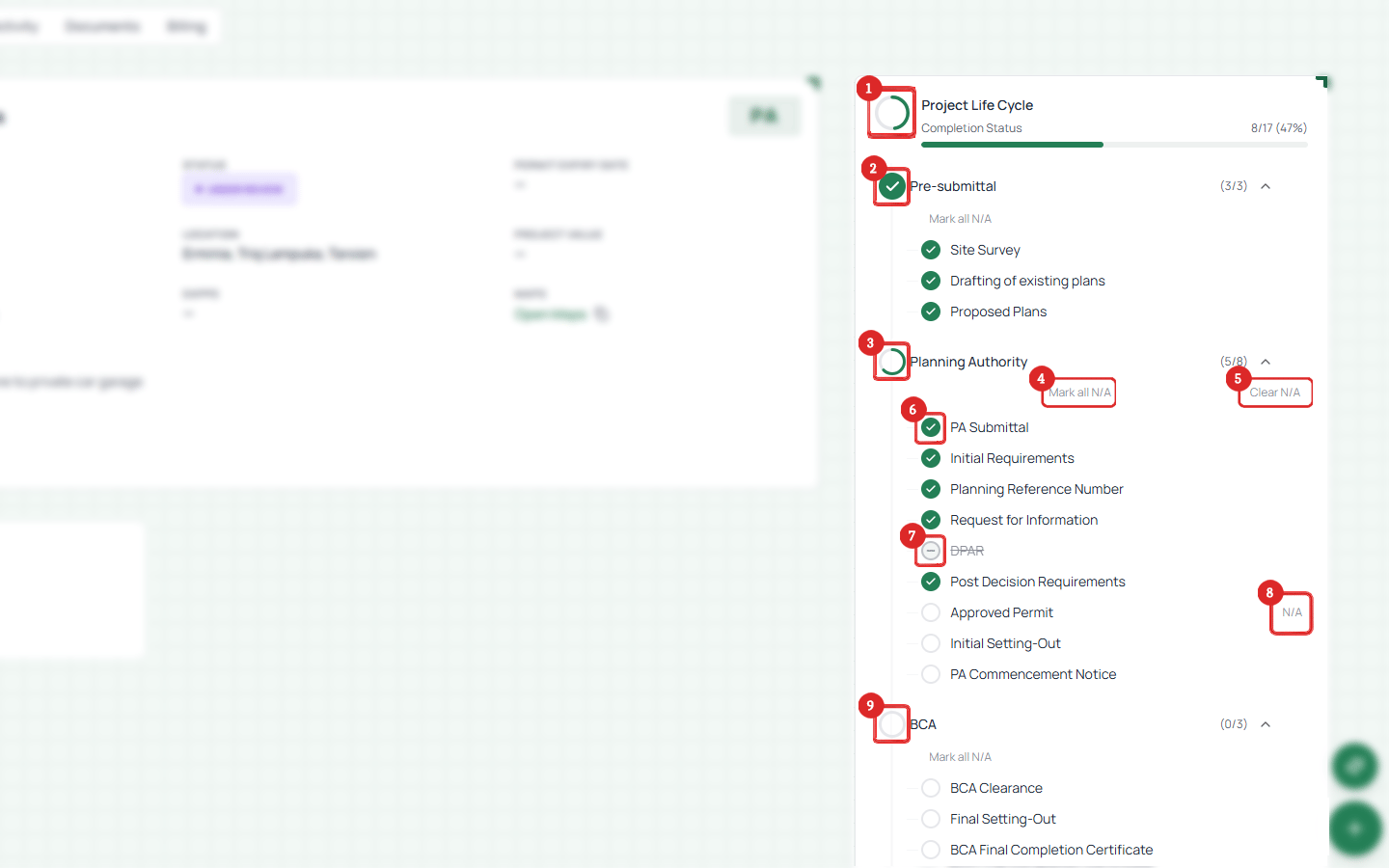 1. **Life Cycle header** — overall completion count (e.g. 8/17 phases, 47%)
2. **Stage indicator** — green check means all phases in that stage are complete
3. **Stage name** — expandable section grouping related phases
4. **Mark all N/A** — skip all phases in a stage at once
5. **Clear N/A** — undo a bulk N/A marking
6. **Phase status** — green check = done, empty circle = pending
7. **Partial stage** — in-progress icon when some phases are complete but not all
8. **N/A badge** — phase marked as not applicable to this project
9. **Incomplete stage** — red icon, no phases done yet
## How it works
* When you create a project, its lifecycle phases are set up automatically based on the project type
* Phases appear in order on the project detail page
* Mark a phase as complete when that milestone is reached
* You don't have to complete them in order, but the sequence represents the typical flow
## Phases by project type
PA projects are the most complex. Their phases are grouped into **4 stages**:
### Pre-submittal
| Phase | Description |
| -------------------------- | ------------------------------------------ |
| Site Survey | Initial site survey and measurements |
| Drafting of existing plans | Drawing up what currently exists on site |
| Proposed Plans | Creating the proposed development drawings |
### Planning Authority
| Phase | Description |
| -------------------------- | ---------------------------------------------------- |
| PA Submittal | Submitting the application to the Planning Authority |
| Initial Requirements | Receiving the initial submission requirements (ISR) |
| Planning Reference Number | Getting the official PA reference number |
| Request for Information | Responding to RFI requests from the PA |
| DPAR | Development Planning Advisory Report |
| Post Decision Requirements | Requirements issued after the PA decision |
| Approved Permit | Receiving the approved permit |
| Initial Setting-Out | First setting-out request |
| PA Commencement Notice | Notifying the PA that works are commencing |
### BCA
| Phase | Description |
| -------------------------------- | ------------------------------------ |
| BCA Clearance | Building Control Authority clearance |
| Final Setting-Out | Final setting-out request |
| BCA Final Completion Certificate | Receiving the BCA final certificate |
### Final
| Phase | Description |
| -------------------------- | ------------------------------------ |
| Release of Bank Guarantees | Getting bank guarantees released |
| Compliance Certificate | Receiving the compliance certificate |
| Bill | Final billing for the project |
Regularisation projects follow a simpler flow:
| # | Phase |
| - | -------------------------- |
| 1 | PA Submittal |
| 2 | Initial Requirements |
| 3 | Planning Reference Number |
| 4 | Request for Information |
| 5 | RAP |
| 6 | Post Decision Requirements |
| 7 | Approved Permit |
| 8 | Bill |
Development Notification Orders:
| # | Phase |
| - | -------------------------------- |
| 1 | PA Submittal |
| 2 | Initial Requirements |
| 3 | Request for Information |
| 4 | Decision Notice |
| 5 | PA Commencement Notice |
| 6 | BCA Clearance |
| 7 | BCA Final Completion Certificate |
| 8 | Bill |
Dangerous Structure projects:
| # | Phase |
| - | -------------------------------- |
| 1 | PA Submittal |
| 2 | Initial Requirements |
| 3 | Planning Reference Number |
| 4 | Request for Information |
| 5 | Dangerous Structure Decision |
| 6 | BCA Clearance |
| 7 | BCA Final Completion Certificate |
| 8 | Bill |
Compliance submissions:
| # | Phase |
| - | ------------ |
| 1 | PA Submittal |
| 2 | Compliance |
| 3 | Bill |
Certificate of Development:
| # | Phase |
| - | -------------------- |
| 1 | PA Submittal |
| 2 | Approved Certificate |
| 3 | Bill |
General Service (no stage grouping):
| # | Phase |
| - | ------------ |
| 1 | Contracts |
| 2 | PA Documents |
Pre-Consultation (no stage grouping):
| # | Phase |
| - | ---------------------- |
| 1 | PA Submission |
| 2 | Pre-Submittal Drawings |
| 3 | Approved Drawings |
Projects of type **Other** have no lifecycle phases. Use this for work that doesn't follow a permit process.
1. **Life Cycle header** — overall completion count (e.g. 8/17 phases, 47%)
2. **Stage indicator** — green check means all phases in that stage are complete
3. **Stage name** — expandable section grouping related phases
4. **Mark all N/A** — skip all phases in a stage at once
5. **Clear N/A** — undo a bulk N/A marking
6. **Phase status** — green check = done, empty circle = pending
7. **Partial stage** — in-progress icon when some phases are complete but not all
8. **N/A badge** — phase marked as not applicable to this project
9. **Incomplete stage** — red icon, no phases done yet
## How it works
* When you create a project, its lifecycle phases are set up automatically based on the project type
* Phases appear in order on the project detail page
* Mark a phase as complete when that milestone is reached
* You don't have to complete them in order, but the sequence represents the typical flow
## Phases by project type
PA projects are the most complex. Their phases are grouped into **4 stages**:
### Pre-submittal
| Phase | Description |
| -------------------------- | ------------------------------------------ |
| Site Survey | Initial site survey and measurements |
| Drafting of existing plans | Drawing up what currently exists on site |
| Proposed Plans | Creating the proposed development drawings |
### Planning Authority
| Phase | Description |
| -------------------------- | ---------------------------------------------------- |
| PA Submittal | Submitting the application to the Planning Authority |
| Initial Requirements | Receiving the initial submission requirements (ISR) |
| Planning Reference Number | Getting the official PA reference number |
| Request for Information | Responding to RFI requests from the PA |
| DPAR | Development Planning Advisory Report |
| Post Decision Requirements | Requirements issued after the PA decision |
| Approved Permit | Receiving the approved permit |
| Initial Setting-Out | First setting-out request |
| PA Commencement Notice | Notifying the PA that works are commencing |
### BCA
| Phase | Description |
| -------------------------------- | ------------------------------------ |
| BCA Clearance | Building Control Authority clearance |
| Final Setting-Out | Final setting-out request |
| BCA Final Completion Certificate | Receiving the BCA final certificate |
### Final
| Phase | Description |
| -------------------------- | ------------------------------------ |
| Release of Bank Guarantees | Getting bank guarantees released |
| Compliance Certificate | Receiving the compliance certificate |
| Bill | Final billing for the project |
Regularisation projects follow a simpler flow:
| # | Phase |
| - | -------------------------- |
| 1 | PA Submittal |
| 2 | Initial Requirements |
| 3 | Planning Reference Number |
| 4 | Request for Information |
| 5 | RAP |
| 6 | Post Decision Requirements |
| 7 | Approved Permit |
| 8 | Bill |
Development Notification Orders:
| # | Phase |
| - | -------------------------------- |
| 1 | PA Submittal |
| 2 | Initial Requirements |
| 3 | Request for Information |
| 4 | Decision Notice |
| 5 | PA Commencement Notice |
| 6 | BCA Clearance |
| 7 | BCA Final Completion Certificate |
| 8 | Bill |
Dangerous Structure projects:
| # | Phase |
| - | -------------------------------- |
| 1 | PA Submittal |
| 2 | Initial Requirements |
| 3 | Planning Reference Number |
| 4 | Request for Information |
| 5 | Dangerous Structure Decision |
| 6 | BCA Clearance |
| 7 | BCA Final Completion Certificate |
| 8 | Bill |
Compliance submissions:
| # | Phase |
| - | ------------ |
| 1 | PA Submittal |
| 2 | Compliance |
| 3 | Bill |
Certificate of Development:
| # | Phase |
| - | -------------------- |
| 1 | PA Submittal |
| 2 | Approved Certificate |
| 3 | Bill |
General Service (no stage grouping):
| # | Phase |
| - | ------------ |
| 1 | Contracts |
| 2 | PA Documents |
Pre-Consultation (no stage grouping):
| # | Phase |
| - | ---------------------- |
| 1 | PA Submission |
| 2 | Pre-Submittal Drawings |
| 3 | Approved Drawings |
Projects of type **Other** have no lifecycle phases. Use this for work that doesn't follow a permit process.